On launch day your product gets linked from an X post, two newsletters, a few directories and maybe Hacker News. A week later your analytics says most visitors came from "direct" and you cannot tell which of those places was worth the effort. UTM parameters fix that with a few words added to each link.
This guide explains what each parameter does, how two common analytics tools read them, and the exact links to use for the usual launch channels. It is based on the help pages of Google Analytics 4 and Plausible, read in October 2026.
What are UTM parameters?
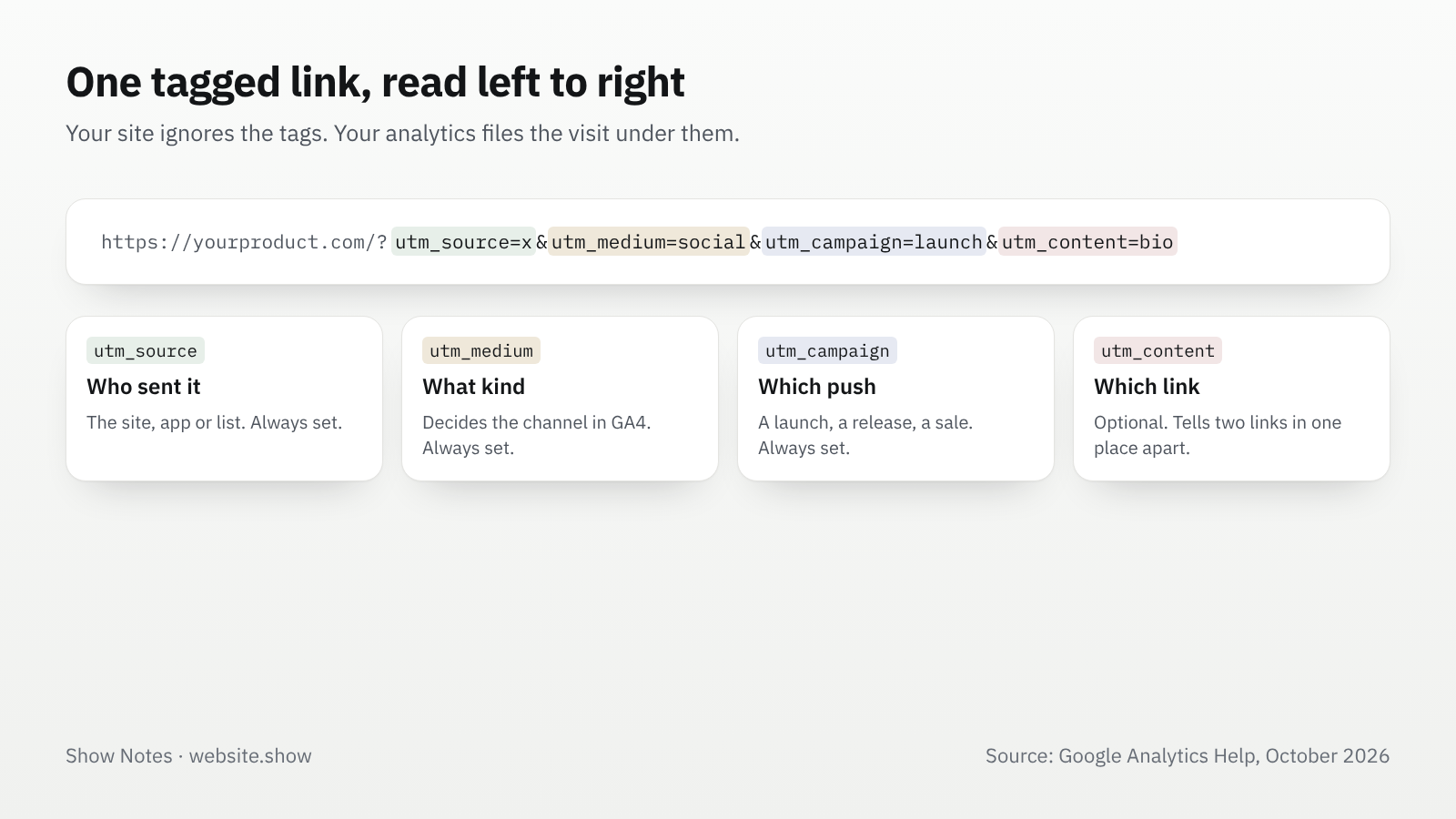
They are tags at the end of a link that tell your analytics where the visitor came from. Your site ignores them and the page looks the same. Your analytics reads them and files the visit under the source you named.
https://yourproduct.com/?utm_source=x&utm_medium=social&utm_campaign=launchWithout tags, analytics guesses the source from the referrer, the address of the page the visitor came from. Apps, email clients and many privacy settings send no referrer at all, so those visits land in "direct". A tagged link carries its source inside it and does not depend on the referrer.
Which UTM parameters should you use?
Three on every link, two more when they help. Google Analytics says you should always set utm_source, utm_medium and utm_campaign, and missing ones show up as "(not set)" in reports.
| Parameter | What it answers | Example values |
|---|---|---|
utm_source | Which site, app or list sent the visit | x, hackernews, friday-letter |
utm_medium | What kind of channel it was | social, email, referral |
utm_campaign | Which push it belongs to | launch, v2-release |
utm_content | Which link or version, when one place has several | bio, thread-reply |
utm_term | The paid keyword, for search ads | rarely needed for a launch |
Google Analytics 4 also reads utm_id, a campaign ID, and utm_source_platform, the ad platform that sent the traffic. Small launches can skip both.
How does Google Analytics read UTM parameters?
It turns them into a source, a medium and a channel. In Google Analytics 4 you see them under Acquisition, then Traffic acquisition. That report groups visits by channel by default. Switch the dimension to source and medium to see your exact tags.
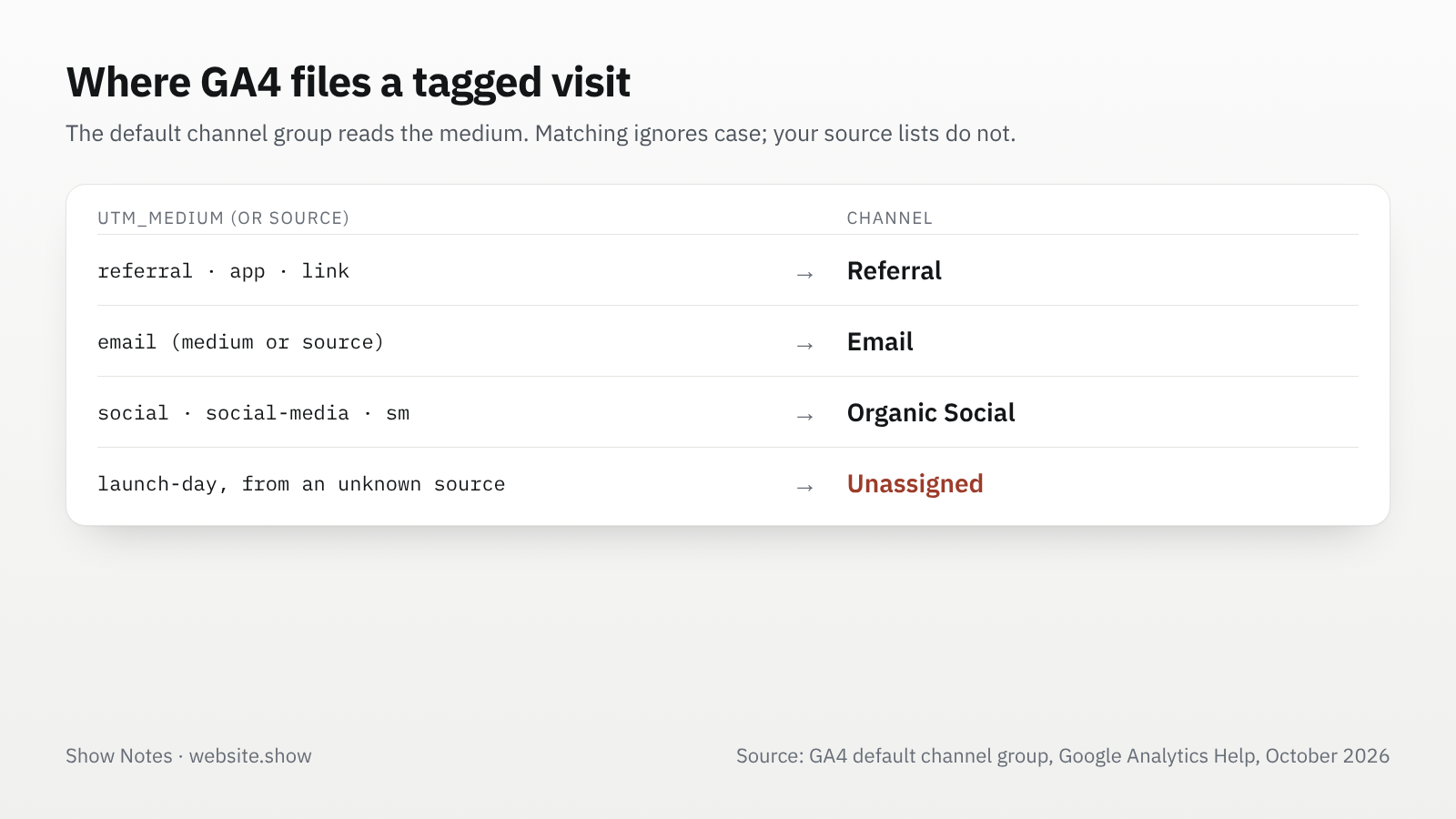
The medium decides the channel. GA4's default channel rules put a visit in Referral when the medium is referral, app or link, in Email when the source or medium is email, and in Organic Social when the medium is social or the source is a known social site. When neither the medium nor the source matches a rule, the visit lands in Unassigned, which is the most common reason a carefully tagged launch disappears from the channel view.
Values are case sensitive in the reports. Google's own example is that utm_source=google and utm_source=Google count as two different sources. The channel rules themselves ignore case, but your source and campaign lists will split.
How does Plausible read them?
Much the same way, with a few extras. Plausible reads utm_source, utm_medium, utm_campaign, utm_content and utm_term, and also treats a plain ref or source parameter as the source. They appear in the Campaigns tab of the dashboard. When a link has a UTM tag, Plausible says it "takes priority over other parameters".
Fathom, Umami and most other analytics tools read the same names, so one set of tagged links works across all of them.
What links should you use on launch day?
One link per place, written once and reused. Keep every value lowercase and use hyphens, never spaces.
| Where you post | The link's tags | GA4 channel |
|---|---|---|
| Your X post | ?utm_source=x&utm_medium=social&utm_campaign=launch | Organic Social |
| Your X bio | ?utm_source=x&utm_medium=social&utm_campaign=launch&utm_content=bio | Organic Social |
| Your own newsletter | ?utm_source=friday-letter&utm_medium=email&utm_campaign=launch | |
| A Show HN post | ?utm_source=hackernews&utm_medium=social&utm_campaign=launch | Organic Social |
| A guest post or podcast notes | ?utm_source=podcast-name&utm_medium=referral&utm_campaign=launch | Referral |
Two cautions apply to Hacker News and similar communities. A link stuffed with tags reads like marketing, so many makers post a clean link there and accept the referrer. And never tag a link you do not control: a directory or a newsletter decides its own links.
Do directories add UTM parameters for you?
Some do: on website.show, the link from every listing to the product's site carries utm_source=website.show&utm_medium=referral. A visit from a listing shows in your analytics as website.show with the medium referral, and GA4 files it in the Referral channel. The tag names us, never the visitor.
We do it because a referrer is often missing, and a maker should be able to see what a listing actually sends. The listing's manage page also counts the visitors we sent, from our side, as a floor that ad blockers keep low. You can list a product and see both numbers side by side. Our comparison of seven launch directories covers what else each directory gives a free listing.
If a directory does not tag its links, its visits still appear under its domain whenever the browser sends a referrer. You cannot add tags to someone else's link, so do not ask for a link that includes your own UTM tags unless the directory offers a field for it.
What mistakes break UTM tracking?
Most broken tracking comes from four habits:
- Tagging links between your own pages: a tag on an internal link tells analytics the visitor came from your own campaign, which can credit your own page instead of the place that really sent them.
- Mixing spellings:
X,xandtwitterbecome three sources. Pick one form per source and write it down. - Putting personal data in a tag: Google's policy says the URL path and parameters "must be free of PII", so never put an email address or a name in a UTM value.
- Making up mediums: a medium like
launch-daymatches none of GA4's channel rules, so unless GA4 recognizes the source, the visit lands in Unassigned. Keep the medium to a value the rules know, and put the creative part in the campaign.
A shared sheet with one row per link, source, medium and campaign is enough to keep a small team consistent.
FAQ
Do UTM parameters affect SEO?
Not directly: they describe the visit to your analytics and do not change the page. Keep them off the links inside your own site, and set a canonical on your pages so a tagged address and the clean address count as one page.
Can UTM parameters track conversions?
They tell your analytics where a visit came from. If you also track a sign-up or a purchase as a conversion, your reports can then show which tagged link led to it.
Should I use a UTM builder?
A builder helps you avoid typos. Google offers a free one for Analytics, and our UTM link builder runs in your browser and keeps every value lowercase. A sheet with a formula that joins the values works just as well, as long as everyone uses the same lowercase spellings.
Sources
- URL builders: collect campaign data with custom URLs, Google Analytics Help
- Default channel group, Google Analytics Help
- Traffic acquisition report, Google Analytics Help
- Best practices to avoid sending PII, Google Analytics Help
- Top sources and query parameters, Plausible documentation
We read each page above on October 8, 2026. Analytics tools rename reports from time to time, so a menu on your screen may be labeled slightly differently.