You launched a week ago, searched for your product's name, and Google showed someone else's. That is normal for a new site, and it does not tell you much on its own. Google may not have found the site yet, may have found it and not indexed it, or may have indexed it and ranked it low for that query.
This guide shows how to tell those cases apart with Google's own tools, what the statuses in Search Console mean, and what you can do to help. Everything here comes from Google's documentation as of October 2026.
How long does Google take to index a new site?
Google says it can take a few weeks to notice a new site or a change to an existing one. Its page on recrawling puts a single crawl at anywhere from a few days to a few weeks. There is no fixed time.
Google finds pages mainly by following links from pages it already knows, and by reading sitemaps. A brand new domain with no links pointing to it is the hardest case, because nothing leads Google there. Its own guide on getting into Google lists "no other sites link to yours" as a common reason a site does not show up yet.
What is the quickest way to check if Google indexed your site?
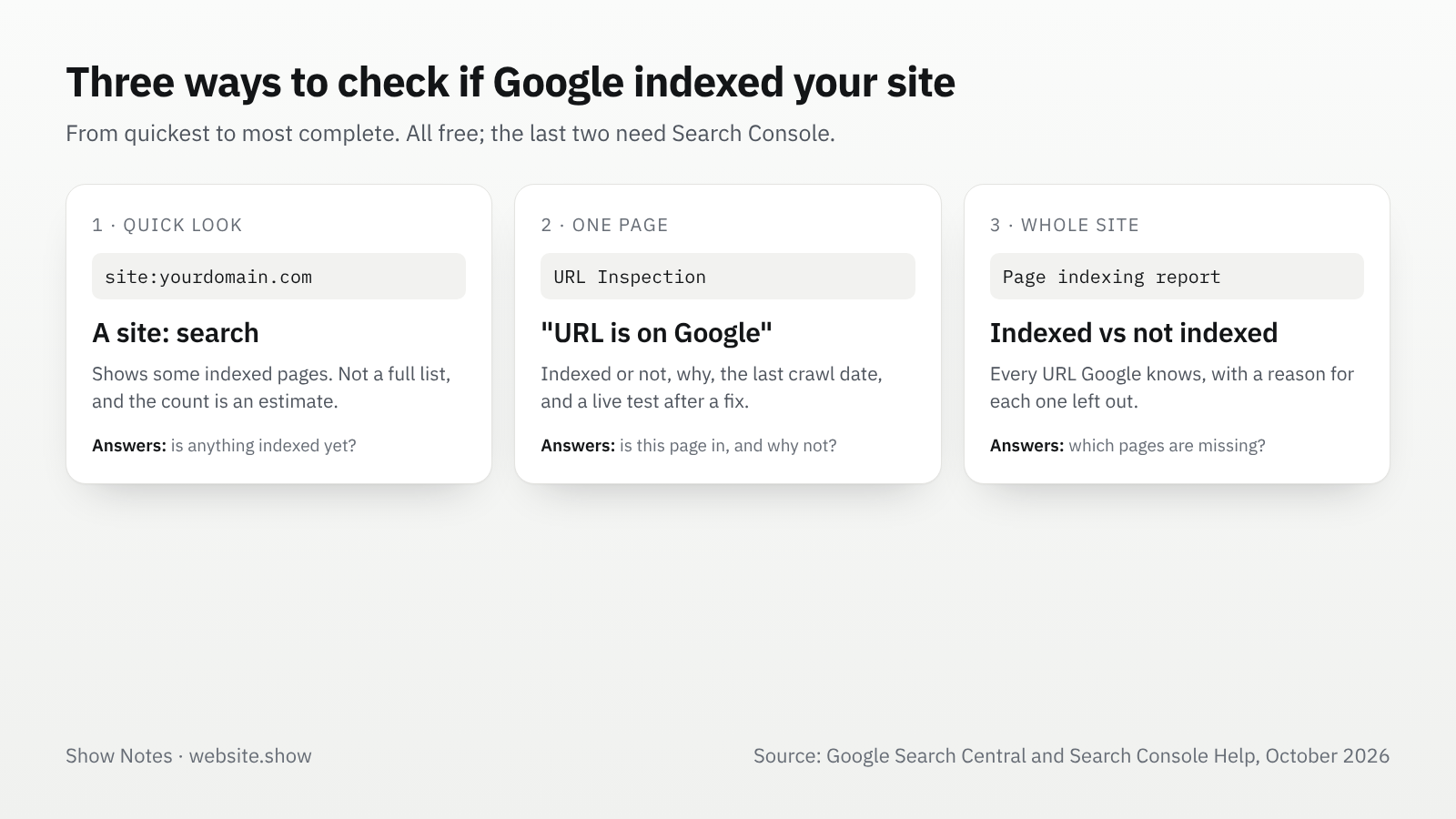
Search Google for site:yourdomain.com. If pages appear, Google has indexed at least those. If nothing appears, it is a strong hint that the site is not indexed yet.
Treat it as a quick look, not a count. Google says the site: operator "doesn't necessarily return all the URLs that are indexed" under the domain. A page missing from that list may still be indexed, and the number of results it shows is an estimate.
For one specific page, search for its full address. That is also what Google's own help suggests "for a definitive test of whether your URL is appearing".
How do you check if Google indexed a page?
Add your site to Google Search Console and verify that you own it. Then paste a page's address into the search bar at the top, which opens the URL Inspection tool.
It answers with one of two results:
- URL is on Google: the page is indexed and can appear in search. Google adds that this "doesn't actually guarantee" it will appear for any particular query.
- URL is not on Google: the page is not in the index, and the report says why: blocked by robots.txt, marked
noindex, a duplicate of another page, or simply not crawled yet.
The Test live URL button fetches the page as it is right now, which is useful after you fix something. If the live test shows the page can be indexed, Request indexing asks Google to crawl it. Google says this typically takes a day or so and can take much longer, there is a daily limit on requests, and "submitting a request does not guarantee" the page will be indexed. Google also says that requesting the same URL several times "won't get it crawled any faster".
How do you see when Google last crawled a page?
Open the page in the URL Inspection tool and expand the coverage details. The Last crawl field shows the date and time Googlebot last fetched it, and Crawled as shows whether it used its smartphone or desktop crawler. A page Google has never fetched has no date there.
The same panel answers the questions behind most indexing problems, one field each. Crawl allowed? shows whether robots.txt lets Googlebot in, Indexing allowed? whether a noindex stops it, and Google-selected canonical which address Google treats as the main version of the page. If that last one is a different URL from yours, Google is indexing the other address instead.
What do the statuses in the Page indexing report mean?
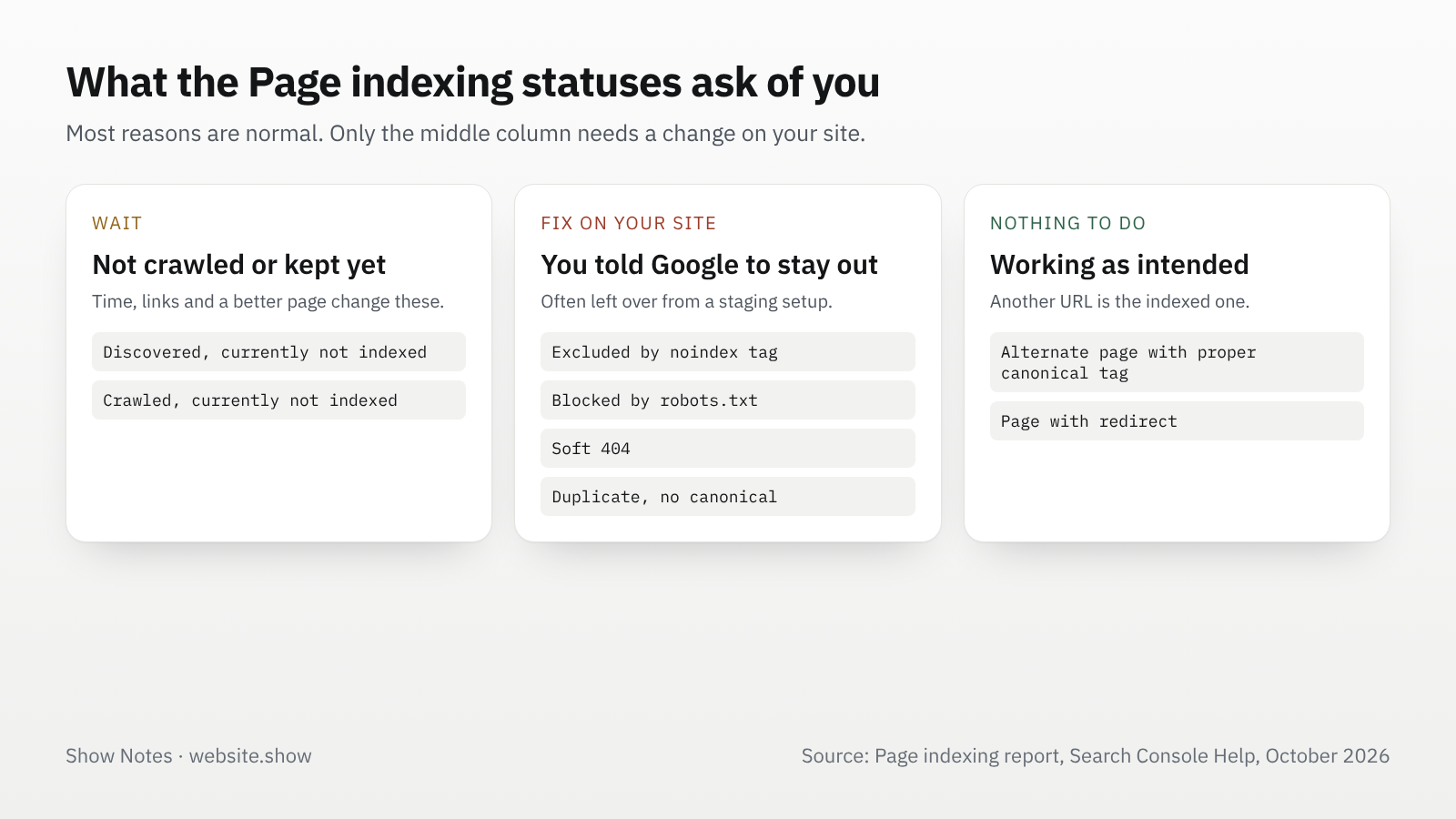
The Page indexing report in Search Console lists every page Google knows about on your site, split into indexed and not indexed, with a reason for each. Most reasons are normal. Google says "it's fine for a URL not to be indexed for the right reasons", and only your important pages need to be in.
| Status | What it means | What to do |
|---|---|---|
| Discovered, currently not indexed | Google found the URL but has not crawled it yet | Usually wait. Links to the page from your own important pages help. |
| Crawled, currently not indexed | Google crawled it and chose not to index it for now | No need to resubmit. Make sure the page says something other pages don't. |
| Excluded by noindex tag | The page asks not to be indexed | Remove noindex if you want it in search. |
| Blocked by robots.txt | Google was told not to fetch it | Remove the rule if the page should be found. |
| Duplicate without user-selected canonical | Google picked another URL as the main version | Set a canonical on the version you want. |
| Alternate page with proper canonical tag | It points to a canonical page that is indexed | Nothing. This is working as intended. |
| Page with redirect | The URL redirects, so only its target is indexed | Nothing, as long as the target is the page you want. |
| Soft 404 | The page looks empty or "not found" but returns 200 | Return a real 404, or give the page real content. |
On a new site, the two "currently not indexed" statuses are the ones you will see most. They mostly mean Google has not yet decided your pages are worth crawling or keeping, which time, links and better pages change.
What stops a new site from being indexed?
Most often, nothing points to it yet. After that, the usual causes are settings that tell Google to stay away, often left over from development.
- A
noindexmeta tag or header left on from a staging setup or a site builder's "hide from search engines" switch. - A robots.txt that blocks everything, such as
Disallow: /for all user agents. Our guide to robots.txt for AI crawlers shows how to read the file in two minutes. - Pages that need a login, or a homepage that shows nothing until scripts run and has no links a crawler can follow.
- Several addresses for the same page, such as
wwwand bare domain both answering, with no redirect or canonical choosing one. - Very thin pages: a homepage with a headline and a sign-up form, and nothing else for Google to index.
URL Inspection shows the first three for any single page. Fix them first, then use Test live URL to confirm before you request indexing again.
How can you help Google find the site sooner?
Give it ways in: Google's own advice for a site that is not showing up is to wait a while and "try to get linked from other sites".
- Submit a sitemap in the Sitemaps report of Search Console, and add it as a
Sitemap:line in robots.txt. Google calls a sitemap "merely a hint" that it may not download, but on a new site it is often the first list of pages Google gets. Keeplastmodaccurate, because Google uses it only when it is consistently right, and skippriorityandchangefreq, which Google ignores. - Get a few real links, because a link from a page Google already crawls is a path to yours. Your own profiles, a launch post, a directory listing on a page about your product, and a guest post all count, followed or not, for discovery.
- Link your important pages from your homepage. A page that nothing on your own site links to is hard for Google to find, sitemap or not.
- Request indexing for the few pages that matter most. Your homepage and your main product or pricing page are enough. The daily limit means you cannot use it for a whole site, and it is not meant for that.
A listing on website.show is one of those links: a page about your product, reviewed by a person, that links to your site and goes into our sitemap once it is open to search. If you are comparing directories for this, our comparison of seven launch directories shows what each free plan includes.
FAQ
Does a site: search show every indexed page?
It doesn't: Google says the site: operator does not necessarily return every indexed URL, and the count it shows is an estimate. Use the Page indexing report in Search Console for the full picture.
How often can I click Request indexing?
There is a daily limit per property, and Google does not publish the exact number. Repeating the request for the same page does not move it up the queue, so use it once per page after a real change.
My page is indexed. Why can't I find it in search?
Being indexed means a page can appear, not that it will rank for a given query. A new site competes with pages that have years of links. Search for the exact page title or address to confirm it is there, then work on the content and links that help it rank.
Does Google index a new site faster if I pay for ads?
It doesn't. Google says it "doesn't accept payment to crawl a site more frequently, or rank it higher", and Google Ads is a separate system from organic search. What helps is the same for everyone: crawlable pages, a sitemap, and links from other sites.
Sources
- Get your website on Google, Google Search Central, updated December 10, 2025
- URL Inspection tool, Search Console Help
- Page indexing report, Search Console Help
- Ask Google to recrawl your URLs, Google Search Central, updated December 10, 2025
- Build and submit a sitemap, Google Search Central, updated July 8, 2026
- How Google Search works, Google Search Central, updated December 18, 2025
- WebsiteShowBot: what our crawler fetches
We read every Google page above on October 8, 2026. Search Console changes its labels from time to time, so the wording on your screen may differ slightly.