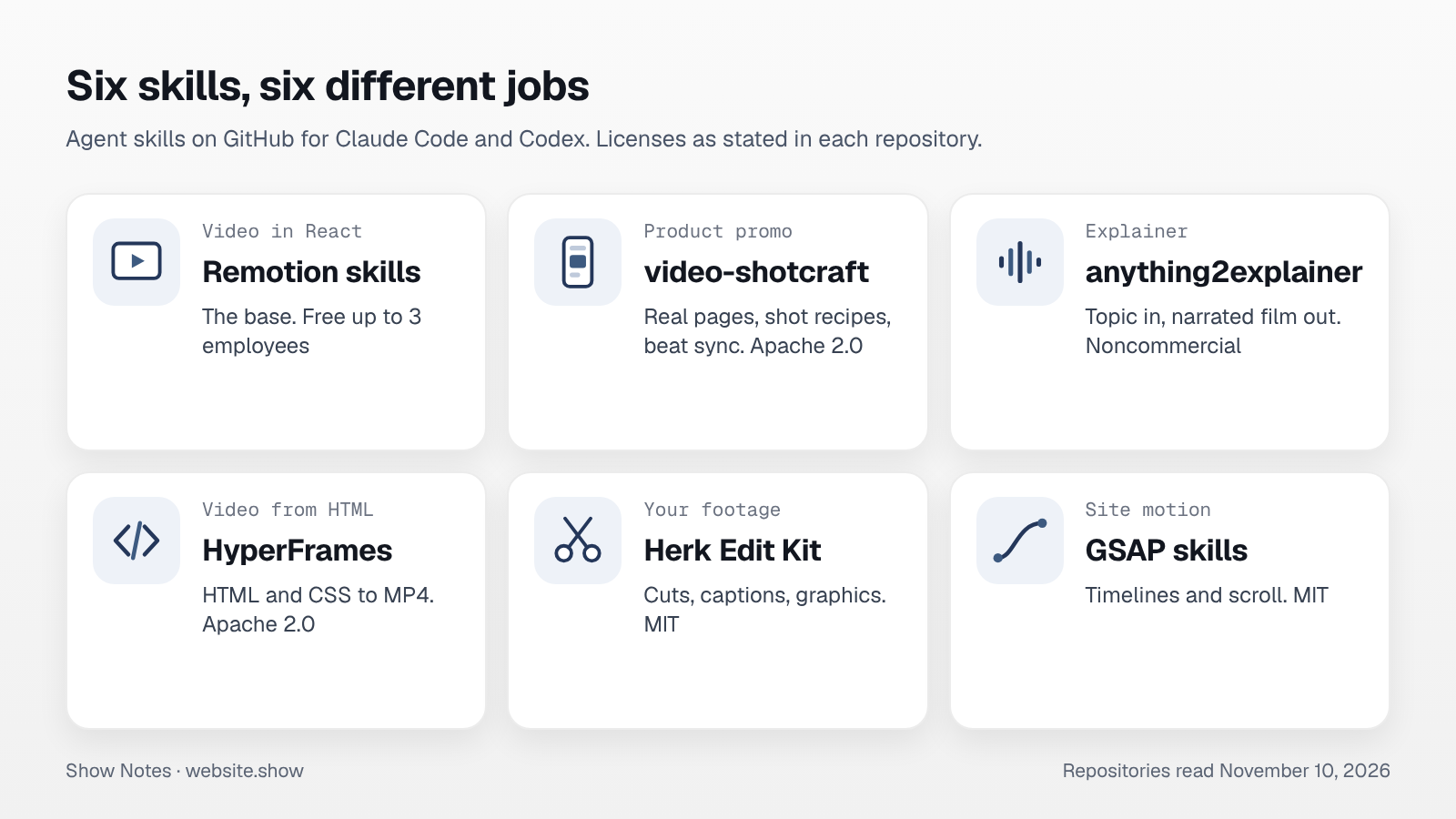
A skill is a folder of instructions and scripts that a coding agent, such as Claude Code or Codex, loads when a task calls for it. Six public ones cover most of the video work around a small product, from a launch promo to motion on the site.
We read each repository on November 10, 2026. Two of the six made the promo for website.show that week, and the post says which. For the other four we report what their own pages state and have not tried them.
How do you install a skill?
Most of the six install with one command from the skills CLI, which copies the folder to where your agent looks for skills:
npx skills add remotion-dev/skillsAfter that you describe the video in plain words, and the agent reads the skill before it writes code. None of these is a video generator. The agent writes code that draws every frame, so text stays sharp and you can change one line and render again.
Remotion skills: the base for video in React
Remotion renders React components to video, and its team maintains an official set of skills for it. The set includes one router skill, remotion-best-practices, plus separate skills for creating a project, writing markup, rendering and captions.
The license is the part to read first. Remotion's own license file says it is free for individuals and nonprofits, and for a for-profit organization "with up to 3 employees". Larger companies need a company license. We read that in the license shipped with Remotion 4.0.537.
We used these skills for the website.show promo. They kept the agent away from the common mistakes, such as animating with CSS transitions, which a frame-by-frame render ignores.
video-shotcraft: a promo from your real pages
video-shotcraft, under Apache 2.0, is built on Remotion and aimed at one job: a product promo. Its README describes the path. The agent captures your real pages and picks shots from a library of tuned motion recipes. Then it writes a storyboard, cuts it to the beat and adds sound. The library held 124 cards with 150 shots when we read it.
We made a 30-second vertical promo with it on November 10. What worked well was the rule set that comes with the shots. Two examples: type at three frames a key, and hold the logo for a full second. Those rules did more for the result than any single effect.
What it asks of you: screenshots it can take, so the pages must be public or running locally, and a track with a clear beat. It ships a few music tracks from Mixkit, and its notes ask you to check a track's license again before commercial use.
anything2explainer: a narrated explainer from a topic
anything2explainer turns a topic or an article into a narrated explainer on a black canvas, with a voiceover and subtitles. Its README gives the output as 1280 by 720 and says lengths from 2 to 8 minutes work. It also says a film takes roughly 1 to 3 hours, and that you are asked to decide at four checkpoints.
Its license is PolyForm Noncommercial, so a business needs the author's permission before using it for marketing. We asked and got it, and we have installed the skill, but we have not finished a film with it yet.
HyperFrames: video from plain HTML
HyperFrames, from HeyGen under Apache 2.0, renders HTML and CSS with seekable animations to MP4. Its README calls it "a free, open-source framework" and lists Node 22 or newer. If you would rather not write React, this is the alternative base. The desktop Studio app is free too, with a paid Pro plan that adds HeyGen's generation models.
We stayed with Remotion because our templates were already written in it, so we have not used HyperFrames.
Herk Edit Kit: edits of your own recordings
Herk Edit Kit, by Nate Herk under the MIT license, is for footage you recorded yourself. It is built on HyperFrames and ships 15 skills: among them cutting silences, finding mistakes and adding captions. Transcription can run through a paid service or through local Whisper, so the starter needs no API key.
It is the one to try if your launch video is you talking to a camera, though we have not used it ourselves.
GSAP skills: motion on the site itself
The GSAP skills are the official ones from GreenSock, under MIT. Eight skills teach an agent timelines, ScrollTrigger and the bindings for React and other frameworks. The README states that GSAP is free for everyone, commercial use included, with every plugin.
This one is for the landing page, not for a video file: a hero that assembles as it loads, or a section that reveals on scroll. Keep such motion out of the way of the first paint, and turn it off for visitors who ask for reduced motion.
How does a 30-second promo come together?
Here is the order we followed for the website.show promo, which is close to what video-shotcraft prescribes.
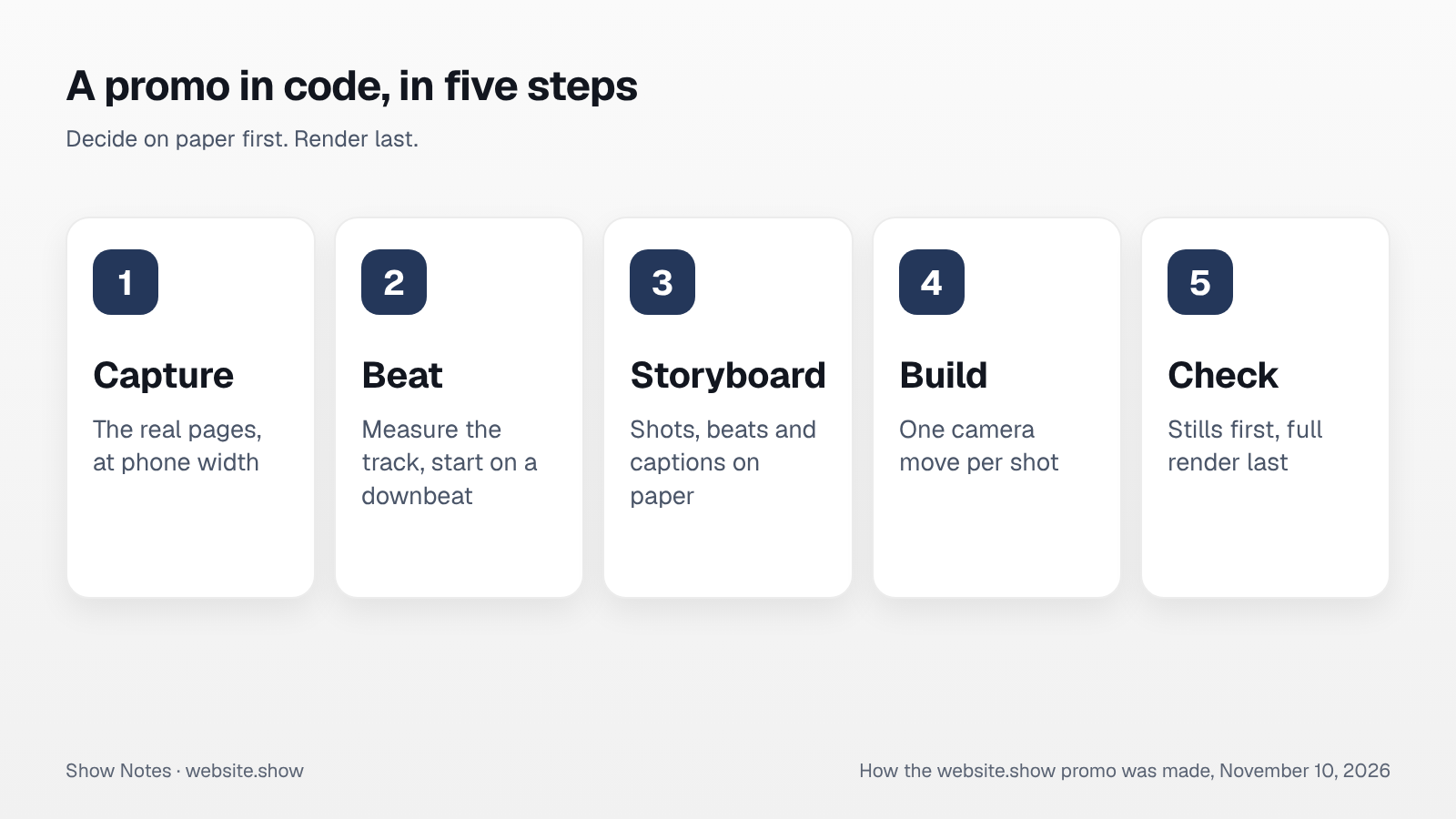
- A script captures the real pages: it opens the site at phone width and saves each page at four times the size, along with the position of every element that will move.
- Next comes the beat. We measured the track at 122 beats a minute and started the cut on a downbeat, so beat 20 is always the same frame.
- The storyboard is written in beats: seven shots, and each one gets a start beat, a single technique and a caption of five words or fewer.
- Each shot is built as a camera move over a capture, with small overlays for what changes, such as typed text or a row dropping in.
- Stills get checked before any full render, because ten frames at quarter size show most layout mistakes in a minute. The full render of 885 frames took about six minutes on two CPU cores.
One thing to plan for: the agent cannot hear. It can place every sound on the right frame and check for clipping, but whether the mix feels right is yours to judge.
Which skill should you start with?
What you already have decides it. With a live product and no footage, the Remotion skills with video-shotcraft get you a promo from screenshots. If you have a recording of yourself, Herk Edit Kit is built for that. If you have a topic and an audience that reads tutorials, anything2explainer fits, once the license question is settled.
Whatever you make, the video needs somewhere to send people, and a listing page is one such place. Check that the page it links to is ready with our launch checklist, and that its link preview has an image of the right size, since that preview is what shows when the video's link is shared.
FAQ
Do these skills work outside Claude Code?
Most of them do, since Remotion's README names Claude Code, Codex, Kimi Code and Cursor. video-shotcraft and anything2explainer name Claude Code and Codex. The GSAP skills list more than 40 agents through the skills CLI.
Is a video made this way free to use commercially?
It depends on each license in the chain. Apache 2.0 and MIT allow commercial use. Remotion is free up to 3 employees in a for-profit company. anything2explainer is noncommercial unless its author agrees otherwise. Music and fonts carry their own licenses too.
How long does a promo take?
Ours took one working session for a 30-second cut, most of it spent on the storyboard and on checking frames. anything2explainer's README estimates 1 to 3 hours for a narrated film.
Sources
- Remotion Agent Skills, README, read November 10, 2026
- Remotion License, as shipped with Remotion 4.0.537
- video-shotcraft, README and LICENSE, read November 10, 2026
- anything2explainer, README and LICENSE, read November 10, 2026
- HyperFrames, README and LICENSE, read November 10, 2026
- Herk Edit Kit, README and LICENSE, read November 10, 2026
- GSAP AI Skills, README and LICENSE, read November 10, 2026