Every few weeks a new checklist tells founders to add an llms.txt file "so ChatGPT can find you". The file is real and easy to write. What it does for a small product depends on who reads it, and that list is shorter than the checklists suggest.
This guide covers what goes in the file, which tools use it as of October 2026, what Google has said about it, and when it is worth the time. We publish one ourselves at /llms.txt, so the examples come from a real file.
What is an llms.txt file?
It is a plain Markdown file at the root of a site, at yoursite.com/llms.txt, that tells AI tools what the site is and which pages matter. Jeremy Howard proposed it on September 3, 2024, on llmstxt.org, as a way to help agents use a website.
The idea is close to a sitemap with a summary on top. A sitemap lists every URL for a crawler. An llms.txt lists the few pages a model should read first, each with a line saying what it is, in a format a model reads without parsing HTML.
The proposal also suggests a clean Markdown copy of each useful page at the same address plus .md, such as /docs/setup.md. That part is optional, and most sites that publish an llms.txt skip it.
What goes in the file?
Only one line is required: a top-level heading with the name of the site. Everything else is optional and comes in a fixed order.
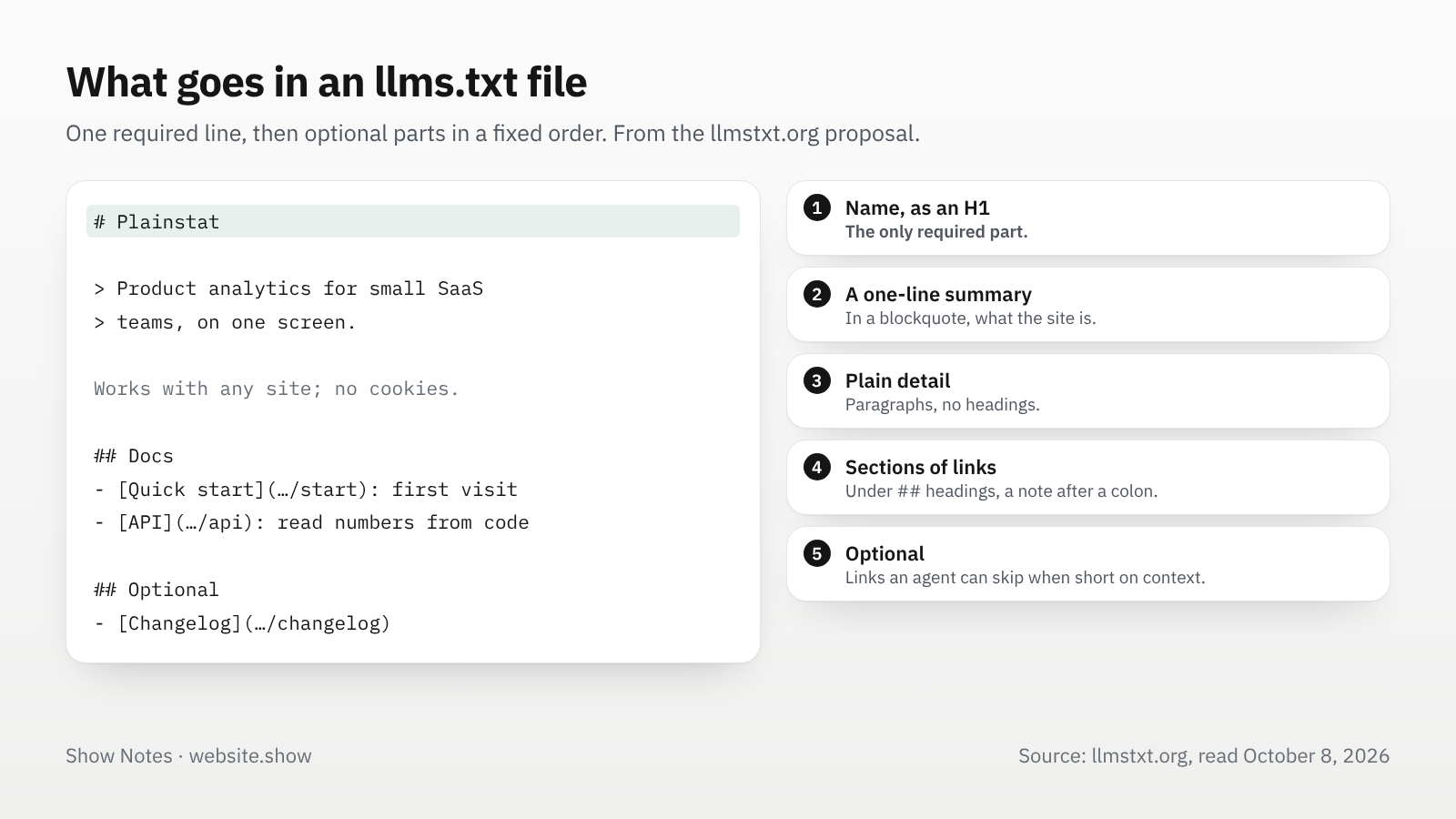
- A heading with the site or project name, the one required part.
- A blockquote with a short summary of what the site is.
- Any number of plain paragraphs with more detail, without headings.
- Sections under
##headings, each a list of Markdown links, with an optional note after a colon. - A section called
Optional, for links an agent can skip when it needs less context.
Here is a short file for a small product:
# Plainstat

> Product analytics for small SaaS teams, on one screen, without cookies.

## Docs

- [Quick start](https://plainstat.example/docs/start): add the script and see the first visit
- [API](https://plainstat.example/docs/api): read your numbers from code

## Product

- [Pricing](https://plainstat.example/pricing): plans and what each includes

## Optional

- [Changelog](https://plainstat.example/changelog)
Ours follows the same shape: it names website.show in the heading, sums the site up in the blockquote, then lists our main pages, the blog, the categories that are open to search and the products that are.
What is llms.txt used for?
Mostly tools that work with documentation, not the assistants people ask for product recommendations. That is the gap between what the checklists promise and what the file does today.
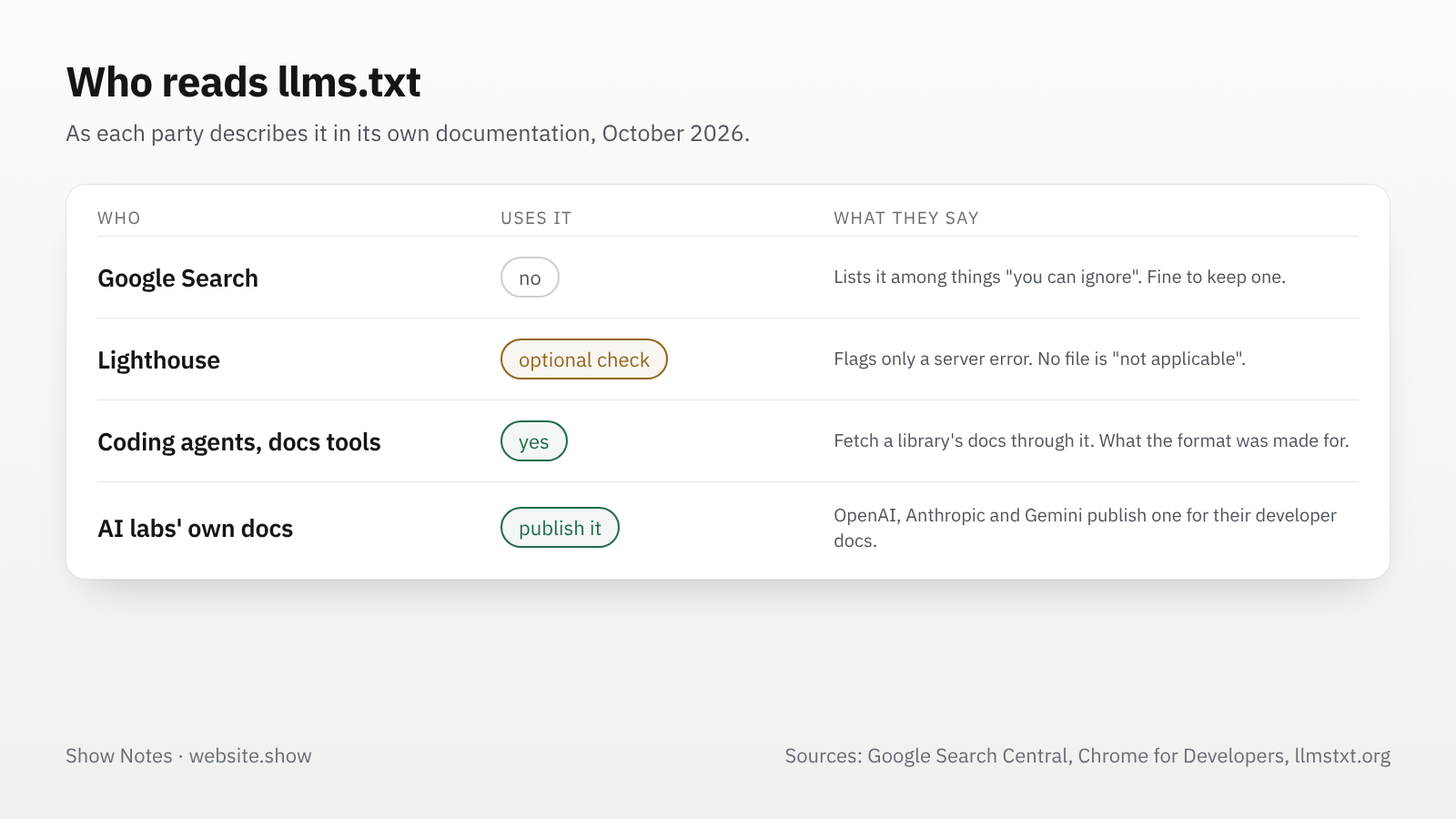
The proposal itself lists where the file is used: coding agents that fetch a library's documentation, chat assistants with search, documentation platforms that generate the file for you, and AI labs that publish one for their own developer docs. It does not claim that any assistant reads it when deciding which product to recommend.
Google's Chrome team added an llms.txt audit to Lighthouse in 2026, in a category for agentic browsing. It calls the file "an emerging convention". The audit only flags a server error when the file is requested. A site without the file, answering 404, is marked not applicable, "as providing the file is optional at the moment".
Does llms.txt help SEO?
Google Search says you can skip it. Its guide to AI features, updated July 10, 2026, lists "LLMS.txt files and other 'special' markup" among the things "you can ignore for Google Search". The same guide adds that it is "completely fine" to create and maintain the file if you want to.
Google's page on AI features and your website says the same in general terms: "You don't need to create new machine readable files, AI text files, or markup to appear in these features." There are no extra technical requirements for AI Overviews or AI Mode.
So the file does not help you rank, in AI Overviews or anywhere else in Google Search. It does not hurt either. What gets a page into those answers is what gets it into search: a page that Googlebot can crawl and that answers the question well. Our robots.txt guide for AI crawlers covers the part that does matter, which is letting the search bots in.
When is it worth adding one?
It pays off when agents read your documentation. If your product has an API, an SDK or setup steps that developers follow inside a coding tool, an llms.txt that points to clean docs saves those tools from crawling your whole site to find them. That is the use the format was designed for.
- A developer tool with docs: worth it. Keep the file next to your docs, list the pages an agent needs to get a first result, and generate it from the same source as the docs so it never drifts.
- A product with a marketing site and a help center: optional. A short file costs ten minutes and does no harm. Do it after the pages themselves are clear, not instead.
- A landing page and a sign-up form: skip it for now. There is too little for a model to navigate, and nothing in it would change how assistants talk about you.
Whatever you decide, the file only repeats what your pages say. A model that reads a clear llms.txt and then a vague homepage still has a vague homepage to quote.
How do you keep the file honest?
Write it from the site, not from what you wish the site said. Every link should open a page that exists and says what the note promises. If you add a summary, use the same words as your homepage, so a model reading both finds one description of your product.
Three habits keep it in shape:
- Generate it from your sitemap or your docs build, or start from a draft by our llms.txt generator, the way we build ours from the same data as our sitemap, so a deleted page drops out by itself.
- Serve it as plain text with a 200 status, and make sure your robots.txt does not block it.
- Read it once a quarter, because a file nobody looks at keeps the old pricing page for years.
Our site check runs on any homepage, and on every product listed on website.show. It reports whether the site serves an llms.txt, next to the robots.txt check, and gives the file the smallest weight of anything it checks, because the format is not a settled standard.
FAQ
Does llms.txt help my site show up in ChatGPT?
Not that anyone has shown. The llms.txt proposal does not claim it, and we found no statement from OpenAI that ChatGPT search reads the file when it picks sources. What decides whether ChatGPT can use your pages is whether its search crawler is allowed to fetch them.
Is llms.txt the same as llms-full.txt?
No. llms-full.txt is a convention some documentation tools use for one file holding the full text of every page. The llmstxt.org proposal does not define it. If your docs tool generates both, there is no harm in serving both.
Can llms.txt get my site penalized?
No. Google says it is fine to keep one, and Lighthouse only flags it when the request fails with a server error. Treat it like any other public page: everything in it should be true and match what the site shows.
Where do I put the file?
At the root of the site, so it opens at yoursite.com/llms.txt. A file under a subfolder, such as /docs/llms.txt, can describe just that section, which suits a product whose docs live apart from the marketing site.
Sources
- The /llms.txt file proposal, llmstxt.org, Jeremy Howard
- Optimizing for generative AI features in Google Search, Google Search Central, updated July 10, 2026
- AI features and your website, Google Search Central, updated December 10, 2025
- llms.txt audit in Lighthouse, Chrome for Developers, updated May 5, 2026
- website.show llms.txt
We read every page above on October 8, 2026. Google and the proposal both change, so check the source before you rely on a detail.